Features Demo Cases Pricing FAQ 中文

Translate directly in CAD,
and keep the text editable.

No exports, no format changes, and no word count fees.

Validated by tens of thousands of engineers on millions of CAD drawings

Contact Us One-click installation package, ready to use

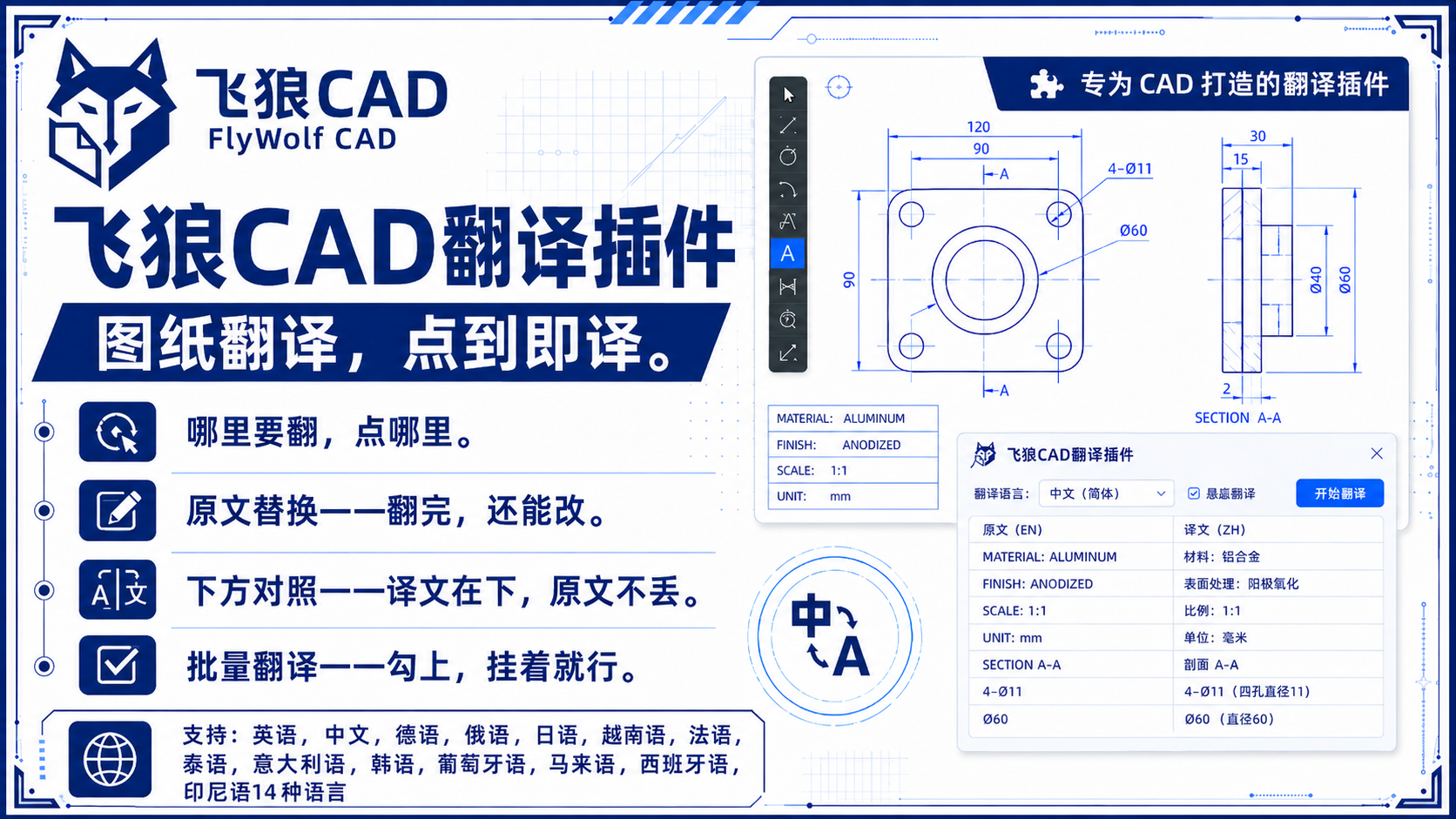
In-place replacement, what you see is what you get

The translation result is text entities, simply double-click to edit

A powerful translation tool designed for engineers

01 / Batch Translation

Select an entire drawing with one click or choose an entire folder for fast batch translation. Say goodbye to tedious manual operations.

02 / 18 Languages Supported

Supports translation between 18 languages including Chinese, English, Russian, Japanese, German, French, Spanish, Arabic, and Turkish.

03 / Mechanical Engineering Glossary

Built-in local glossary. Define your own professional terms (JCT command). Translates using your glossary first, automatically saves new terms, and gets more accurate with use.

04 / Multi-version Support

Supports mainstream AutoCAD 2013–2026 versions and ZWCAD 2026 Professional. ZWCAD has the same features, plan options, and prices as the AutoCAD edition. One current license must be assigned to either AutoCAD or ZWCAD, not both.

05 / Triple Engine Synergy

Triple engine synergy, switch if one fails - Baidu for common languages, DeepSeek for minor languages like Arabic/Turkish/Mongolian/Khmer, and Volcano Engine as a backup. Full coverage of 18 languages.

06 / Keep Original Text Mode

Translation is added below the unchanged original text for bilingual reference - specifically for drawing review, inspection, and foreign-supervised projects.

Real Drawings, Real Translations

All cases are desensitized and authorized for display. Client drawings are kept strictly confidential.

Russian · Machining Part Drawing · Zero layout displacement
Japanese · Electrical Machining Design · Complete translation of dense annotations
English · Foreign Trade Drawing · Bilingual mode
Vietnamese · Outsourced Processing Drawing · Chinese to Vietnamese for Vietnam factory
Thai · Export Equipment Drawing · Chinese to Thai, delivered with machine
Difficult Cases
Difficult Cases · Text in tables / Multi-line annotations in blocks · Impossible for image-level solutions

Why choose FlyWolf?

Core Metrics FlyWolf CAD Plugin Common Translation Solutions
Translation Technology Native DWG Entity Level PDF Image Level / Screenshot
Editable After Translation? ✔️ Yes (Keeps native text properties) ❌ No (Becomes an image or requires redesign)
Supported Languages / Engines 18 languages, switch freely between Baidu Translate/DeepSeek/Volcano Engine, supports minor languages like Arabic and Turkish Limited languages, mostly single engine
Pricing Model Starts at ¥300 Lifetime / Unlimited words Expensive Annual Subscription / Pay per word
Data Security Drawings stay on your machine, only text content is sent to translation API Requires uploading drawings to third-party platforms
Installation & Onboarding ✔️ One-click installer + customer support ❌ Self-installation required, no human support

* ¥300 is the basic single-drawing version. For batch translation, local glossary, and minor languages, see the ¥600 lifetime batch version.

8yrs
Years of Brand Heritage
10k+
Engineers using it
18
Supported Languages

What Engineers Say

"When exporting machining drawings for Russia, we used to convert to PDF and hire a translation agency, taking 3-4 days. With this plugin, we translate directly in CAD. Dimensions and BOMs are replaced in-place, ready to send immediately. Remote installation support was also very helpful."
— Engineer Wang · Mechanical Design · Jiangsu
"My English isn't great, so reading foreign drawings used to rely on guessing and dictionaries. Now I just select the whole drawing, translate it, and view it bilingually. The efficiency is totally different. It's a must-have for engineers who struggle with foreign languages."
— Engineer Liu · Process Engineer · Zhejiang
"It works normally. When Baidu engine authentication failed a few times, customer service remotely switched me to the Volcano engine, and it didn't delay my work. I bought the monthly card to test the waters, now I'm ready to upgrade to the lifetime version."
— Engineer Zhang · Non-standard Automation · Guangdong
"Foreign-supervised projects require bilingual drawings. The Keep Original Text mode is perfect—translation is added below the original text without changing a single word. Inspection passed on the first try. I haven't seen any other solution that can do this."
— Engineer Chen · Project Engineer · Shanghai
"We took a precision parts order from a Japanese client, and the drawing annotations were extremely dense. I was worried they would shift after translation, but the whole drawing translated perfectly with annotations in their original positions, and they are editable via double-click. Japanese terms like tolerance and surface treatment were translated more accurately than I expected."
— Engineer Zhou · Precision Manufacturing · Suzhou
"When sending outsourced machining drawings to our Vietnam factory, they used to misunderstand the Chinese drawings, leading to multiple reworks. Now we translate from Chinese to Vietnamese before sending. Communication costs have dropped significantly, and delivery times are more stable."
— Manager Huang · Outsourced Processing · Dongguan

Simple and Transparent Pricing

Trial Version
¥29
  • 4-day access (Single drawing)
  • FY1/BDFY limit: 2,000 chars/day
    PFY: 1 successful trans/day
  • 14 common languages (Baidu)
  • One-click installer provided
Buy Now
Monthly Version
¥50
  • Single drawing (No batch)
  • 14 common languages (Baidu engine)
  • No local glossary
  • One-click installer provided
Buy Now
Batch Monthly Version
¥100
  • Multi-drawing batch translation
  • 18 languages (3 engines, incl. DeepSeek)
  • Local glossary for higher precision
  • One-click installer provided
Buy Now
Lifetime Version
¥300
  • Single drawing (No batch)
  • 14 common languages (Baidu engine)
  • No local glossary
  • One-click installer provided
Buy Now
FAQ & SUPPORT

Frequently Asked Questions

After purchase, our customer service will send you an easy one-click installation package. Double-click to auto-configure and start using immediately; customer support is available for any questions.
Yes, the plugin needs to call our high-performance cloud translation API. Please ensure your computer is connected to the internet.
Yes, we can issue VAT ordinary and special invoices. Please contact customer service after purchase to provide your invoice details.
Our license is bound to your machine code. If you need to change computers, you can contact customer service to migrate your license.
We currently support 18 languages including Chinese, English, Russian, French, German, Japanese, Korean, Spanish, Portuguese, Italian, Malay, Vietnamese, Thai, Indonesian, Arabic, Turkish, Mongolian, and Khmer.
Switch to Volcano or DeepSeek engine to continue working. Customer service will help you configure it remotely.
The supported environments are mainstream AutoCAD 2013–2026 versions and ZWCAD 2026 Professional. The ZWCAD edition has the same features, plan options, and prices as the AutoCAD edition, but one current license can be assigned to only one CAD environment. GstarCAD remains under adaptation.
Yes. Translated text remains an editable CAD text entity and can be modified further in CAD.
The official names and order are Baidu Translate, DeepSeek, and Volcano Engine.
PRACTICAL GUIDE & INSIGHTS

CAD Translation Column

Leave your next unreadable drawing to FlyWolf.

Contact us via email with a drawing, and we'll translate it for free.

Try Free Translation
× WeChat customer service QR code
Scan WeChat QR code / Free translation trial
微信号:qiqisanwa2026
Long press to recognize QR code
微信号:qiqisanwa2026
Try Free Translation